
Documentation for BrandCocoon.com
Design System
- Overview
- Adobe Swatch Exchange (ASE)
- Adobe COlor (ACO)
- GIMP (GPL)
- Procreate (swatches)
- Text
- Json
- Figma
- Tailwind css
- css RGB
- css HSL
- css Lab
- css OkLch
Overview
In this section you will find accessibility information and complementary semantic colors for use in digital applications.
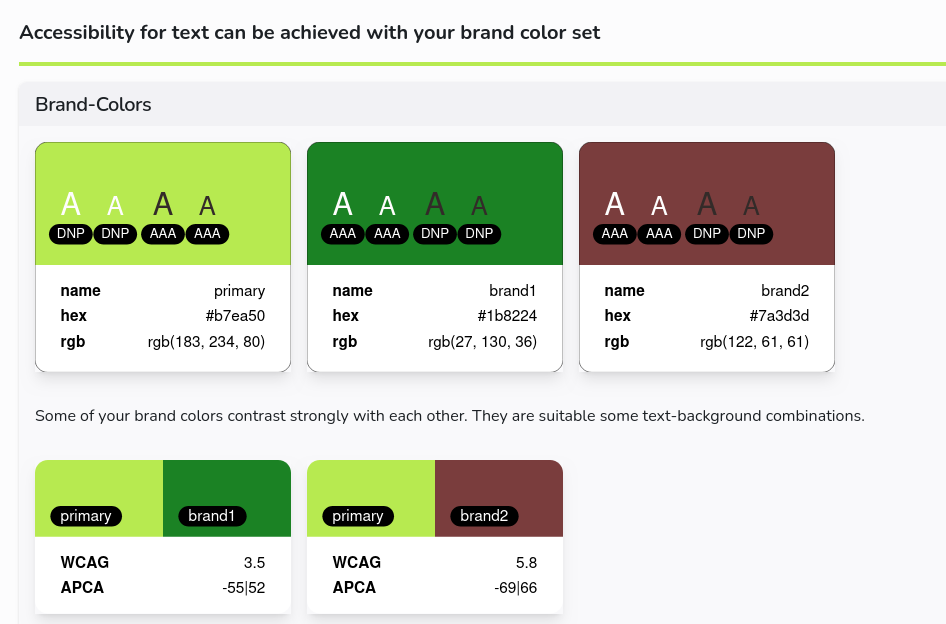
In the upper area, the brand colors are listed and for white and black letters, the contrast level according to WCAG is indicated. For contrast-free combinations, you will receive DNP = do not pass = test failed. AA and AAA have higher-contrast combinations.
In addition, the brand colors are also tested in pairs and documented in a positive case.
In the area of legibility, an analysis of the usability of the trademark colors as text colors on a black and white background is carried out according to both WCAG and APCA.
In the next area, the pairwise analysis of the distinguishability of the brand colors for UI/graphics applications is carried out with the help of the deltaE 2000 color spacing. This is done for both normal vision and color vision deficiency (deuteranopia). Color differences for simulated color vision deficiencies are calculated by first applying a simulation of the color vision deficiency and then evaluating the resulting colors using the CIEDE2000 metric (ΔE00). Since CIEDE2000 is based on the CIE standard observer and not on observers with color vision deficiencies, the values provided should be considered an approximation of color distinguishability under the selected condition. They are intended as a practical heuristic for accessibility and not as a clinically or psychophysically validated measure of perception.
Below you will find a simulation of the brand colors under different color blindness criteria. If you want to use the colours in combination, pay attention to contrast.
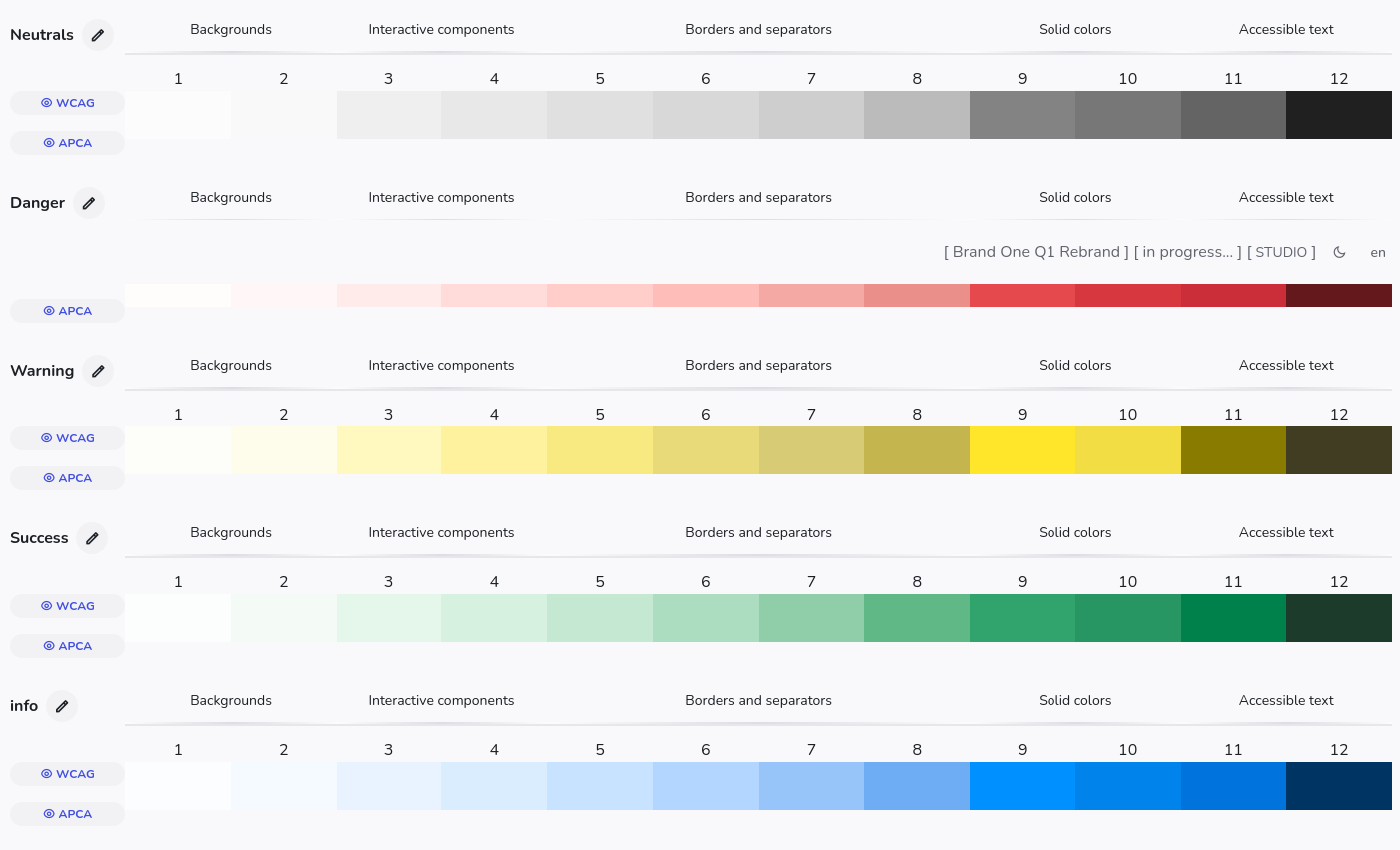
In the next section you will find sematic additions as color scale and for light and dark mode. You can easily change and customize these colors by mixing them with a brand color. The semantic colors are used as "info", "success", "warning" and "error". You will find extensive contrast grids according to WCAG and APCA for a precise assessment of accessibility.
In the Export section, you can export the colors to different formats.
Study with teams include a comment section.
For approved studies, the editing function is disabled.
Export
You can use various export functions.
Adobe COlor (ACO)
An ACO file is a color swatch file used by Adobe Photoshop and other Adobe Creative Suite applications to store and share color palettes. It contains a set of predefined colors.
GIMP GPL
A .gpl file is a Palette file for the open source graphic software GIMP..
GIMP Palette (.gpl) files are plain text files used by the GIMP (GNU Image Manipulation Program) graphics editor to store and share color palettes
GIMP Palette
Name: Brand One
Columns: 5
183 234 80 Primary
27 130 36 brand1
122 61 61 brand2
254 253 253 neutral-light-1
252 248 248 neutral-light-2
245 238 236 neutral-light-3
240 228 226 neutral-light-4
234 219 215 neutral-light-5
228 207 202 neutral-light-6
Procreate swatches
A Procreate swatches file is a file with the .swatches extension that contains a color palette specifically formatted for use in the Procreate app on iPad. These files store up to 30 individual colors that you can import and use as a palette within your Procreate projects.
Text
The text file is a simple list of colors like this:
Palette
Name: Brand One
RGB 183 234 80 - Hex #b7ea50 Primär
RGB 27 130 36 - Hex #1b8224 brand1
RGB 122 61 61 - Hex #7a3d3d brand2
RGB 254 253 253 - Hex #fefdfd neutral-light-1
RGB 252 248 248 - Hex #fcf8f8 neutral-light-2
RGB 245 238 236 - Hex #f5eeec neutral-light-3
RGB 240 228 226 - Hex #f0e4e2 neutral-light-4
Json
The json file is a list of colors like this to be used in frontend applications.
{"name":"Brand One","colors":
  [
    {"rgb":[183,234,80],
      "hex":"#b7ea50",
      "name":"Primär"
    },
    {"rgb":[27,130,36],
      "hex":"#1b8224",
      "name":"brand1"
    },
    {"rgb":[122,61,61],
      "hex":"#7a3d3d",
      "name":"brand2"
    }...
Figma
The figma format is a simple json structure. You can load this file with a popluar plugin color-import-export.
{
  "primar":"#b7ea50",
  "brand1":"#1b8224",
  "brand2":"#7a3d3d",
  "neutral-light-1":"#fefdfd",
  ...
Tailwind css
In v4 of tailwind the custom colors are defined by placing them into the main css file in the @theme block.
@theme {

  --color-primary: #b7ea50;
  --color-brand1: #1b8224;
  --color-brand2: #7a3d3d;
  --color-neutral-light-1: #fefdfd;
  --color-neutral-light-2: #fcf8f8;
  --color-neutral-light-3: #f5eeec;
  ...
Doing so, you have now access to the colors like:
<div class="bg-primary text-brand1">Hello</div>
css RGB
This gives the list of rgb colors
rgb(183 234 80)
rgb(27 130 36)
rgb(122 61 61)
rgb(254 253 253)
rgb(252 248 248)
rgb(245 238 236)
rgb(240 228 226)
rgb(234 219 215)
rgb(228 207 202)
....
css HSL
This gives the list of hsl colors
hsl(79.87deg 78.57% 61.57%)
hsl(125.24deg 65.61% 30.78%)
hsl(0deg 33.33% 35.88%)
hsl(0deg 33.33% 99.41%)
hsl(0deg 40% 98.04%)
hsl(13.33deg 31.03% 94.31%)
...
css LAB
This gives the list of lab colors
lab(87% -33.15 65.88)
lab(47.43% -43.91 40)
lab(33.9% 27.07 12.76)
lab(99.39% 0.34 0.12)
lab(97.89% 1.38 0.5)
lab(94.61% 2.18 1.85)
lab(91.51% 3.96 2.51)
lab(88.55% 4.82 3.92)
...
css OkLch
This gives the list of OkLch colors
oklch(87.27% 0.19 125.84deg)
oklch(53.09% 0.16 143.94deg)
oklch(43.76% 0.09 21.15deg)
oklch(99.48% 0 18.85deg)
oklch(98.22% 0 17.65deg)
oklch(95.4% 0.01 36.7deg)
oklch(92.78% 0.01 28.97deg
...