Documentation for BrandCocoon.com
Positioning
In this section, you will find a color wheel with the brand colors selected in the configuration.
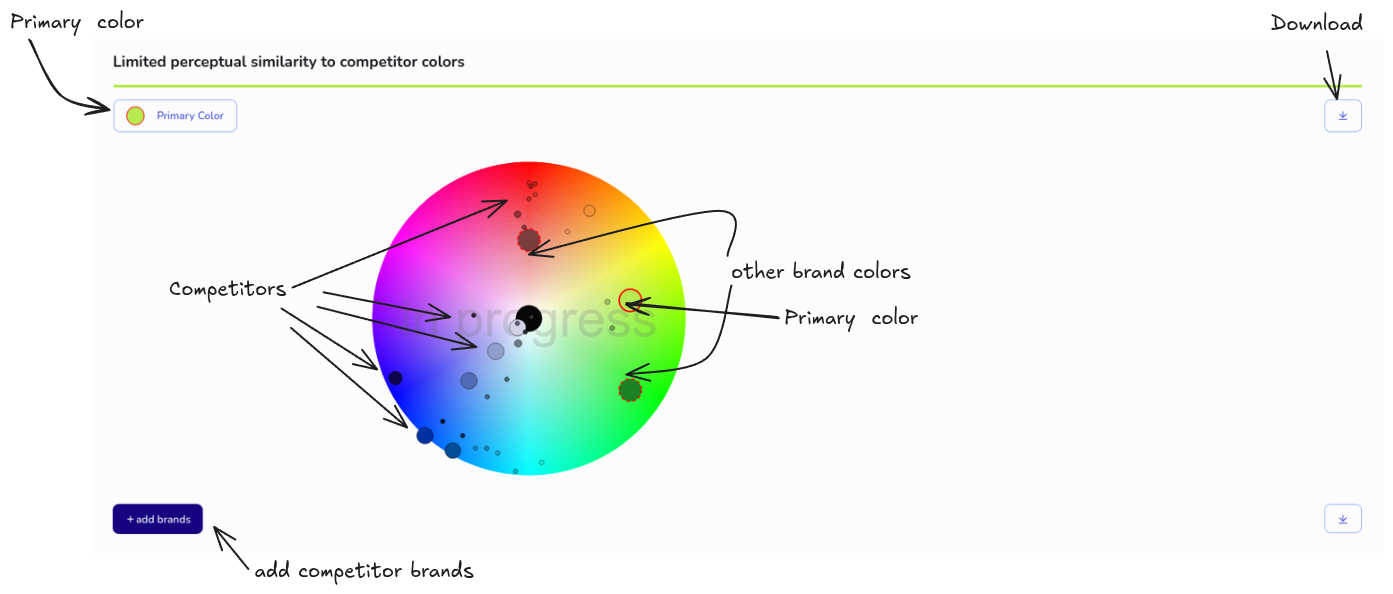
You will find three actions.
- Add Brands: Click to open an area for adding brand colors. Search either by name and then select the appropriate one. Or search by domain. You can make up to 20 domains available in a list. One domain per line. Start the search. Found domains will be added to the list of brands. The corresponding colors are entered in the color wheel. Repeat the search until you have identified enough competitors.
Once some competitor data is available, the “Competitive Positioning” and “Perceived Similarity” values will be updated when you add competitors. The more competitors you enter, the more accurate the results will be.
Essentially, the background calculation of competitive positioning and perceived similarity is performed by determining the perceived color differences (Delta E) between the primary brand color and all competitor colors. These color differences are divided into four categories, with a value of 20+ used for highly distinguishable colors. The proportion of competitor colors with a perceived color difference of 20+ corresponds to our defined value for competitive positioning. A value of 100 means that the primary brand color is highly distinct from all competitor colors included in the analysis. A value of 0 means that the competitor colors are indistinguishable, represent close competitors, or are in the vicinity.
-
Primary Color: One click activates the ability to change the primary brand color. Slide the red and continuous outlined dot on the color wheel and use the slider to adjust the brightness.
-
Download: With one click, you can download areas as an image file.
The "in progress" watermark disappears when you approve the study.
If a brand is missing a color or you want to change it, you have the option to add another one or remove one by double-clicking.
You can save these modifications as standard, so that subsequent studies use the same colors. We save this as your personal preference.
Studies with Teamfunction have a section for comments.
Note: After approving the study, modifications in this sections are blocked.
On the color wheel, brands are represented by dots of varying sizes. Their size is based on their “brand awareness.” However, since there is no universal metric for brand awareness, we derive our own. To do this, we use data such as brand mentions in public lists, online traffic volume, and online rankings.
Clicking on a dot opens additional information with available metadata. Here, you also have the option to request an update of the brand data.